Google Wants Gemini to Build Your Phone Screen. The Real Prize Is the First Request
Create My Widget lets users describe a screen and have Gemini build it. For Alphabet investors, the bigger question is who owns the customer's first request, and usage and retention data should show it.
The 20-second read
1. From hunting for apps to asking for a screen
Picture a business trip. The flight is in your email, the meetings are in your calendar, and the route is in your maps app. The information is already on the phone. Gathering it is still the user's job.
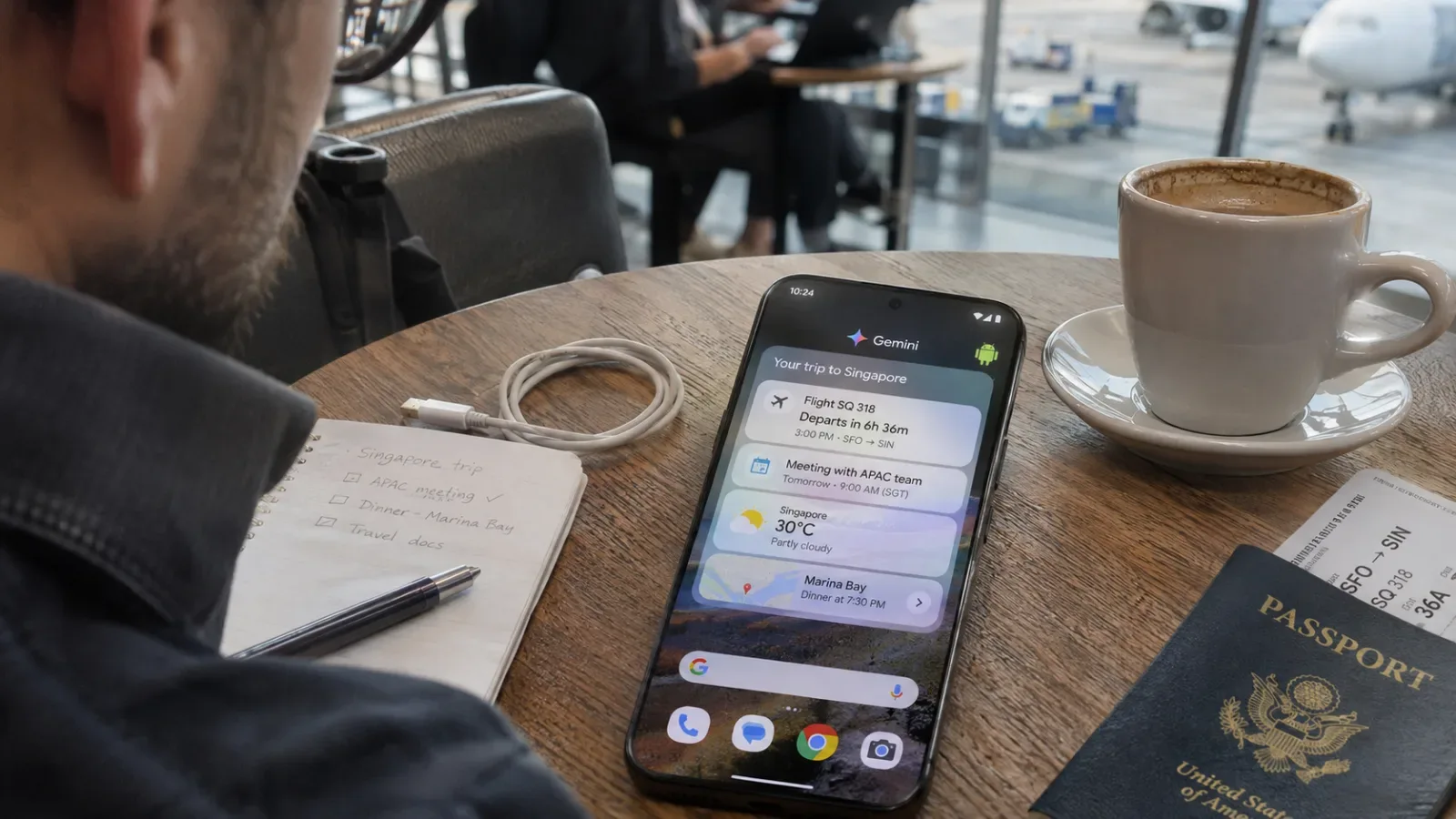
Now imagine saying: "Put my trip schedule and key reservations on my home screen." Instead of opening apps one by one, you ask for the screen you want.
Create My Widget, which Google unveiled on Nov. 10, is a concrete first step in that direction. Users describe a widget in plain language, and Gemini builds it. Travel itineraries, monthly spending trackers and game countdowns can be set up without coding.
The point is not the widget's look. It is that the job of designing the screen is starting to shift from developers to users.

Until now: find the right app → navigate each app's menus → piece the information together by hand.
With an AI-personalized screen: say what you want → Gemini builds a screen from connected information → check it on the home screen.
2. Google's real weapon is not just the AI model
The feature is interesting for more than auto-drawn widgets. Gemini can pull relevant information from Gmail, Calendar and Search and place it on the screen the user asked for.
Personalized AI gets stronger when two things work together: understanding the request, and actually connecting the information the request needs.
Google already touches everyday services such as email, calendar, search and maps. The stronger those links become, the less reason users have to hunt down and combine information scattered across apps.
The moat in personalized AI may come less from one model that answers well than from an ecosystem of services that connects daily context.
3. From widgets to AI that operates apps
In the same announcement, Google introduced Device Assistance. Users can ask AI to clear storage, check which apps can access location, or change notification settings.
Task Automation goes a step further. Gemini handles jobs that span several apps, such as ordering food, hailing a ride or making a reservation. Google said it is expanding supported regions to the UK, India and Japan.
Changes are also planned for the car. For Android Auto, Google is preparing a feature that links information from messages and confirmation emails to suggest what a driver needs on the move.
These look like separate features, but they point the same way. Work that once required users to learn menu structures and move between apps is being understood and taken over by AI. Create My Widget is a personalized widget feature, not a general-purpose app builder that replaces every app.
The next phase of the smartphone contest may turn less on how many apps people launch than on how few steps it takes to finish what they want done.
4. Why Android may look different to GOOGL investors
Investors usually think of search advertising and cloud first when valuing Alphabet. But as personalized AI moves into daily life, Android's strategic role could grow. It holds the phone's home screen and the point where user requests come in.
The shift also raises questions for existing app makers. If AI opens and operates apps for users, or merges several services into one screen, the frequency of direct app visits and the customer relationships built inside apps could change. Existing models for advertising, subscriptions and steering transactions could come under pressure.
That does not mean apps that actually do the work, such as payments, bookings and delivery, disappear. A more likely outcome is a structure in which AI owns the front-end customer contact and individual apps carry out the work behind it.
What investors should watch is not the death of apps but who ends up owning the customer touchpoint.
5. Who becomes the phone's first AI?
Google is not the only contender. Apple has the iPhone as a powerful user touchpoint, and OpenAI is trying to widen how it reaches people with AI at the center. The three are competing for more than a chatbot screen. The prize is the interface where people first hand off a request.
Google's features are rolling out over the coming weeks. Some require Android 17 or later, and availability varies by device, country, language and subscription. Language support also differs by feature.
The signals worth watching are less the polished demos than actual usage, retention that shows repeat use, and paid conversion. Whether people try it once and stop, or hand tasks to AI every day instead of opening apps, is likely to decide the outcome.
Insight Times view: In the AI era, the most valuable real estate may not be inside the best app. It may be the moment a user first says what they want done.
- It is a feature Google unveiled on November 10.
- You describe what you want in plain language, and Gemini builds a custom widget for you.
- With no coding, you can set up screens such as a trip itinerary, a monthly spending tracker or a game countdown.
- No. It is a personalized widget feature.
- It is not a general-purpose app generator that replaces all apps.
- It can pull relevant information from Gmail, Calendar and Search and put it on the screen you want.
- Google's strength is said to be that it already has a foothold in everyday services such as email, calendars and search.
- Device Assistance lets you hand tasks to the AI, such as clearing storage, checking which apps access your location and changing notification settings.
- Task Automation is where Gemini handles jobs that span multiple apps, such as ordering food, hailing a ride or making a reservation.
- That is not yet clear. The features are rolling out in stages over several weeks.
- Some features are available only on Android 17 or later.
- The scope varies by device model, country, language and subscription terms, and Korean-language support also differs from feature to feature.
What to watch
Insight Times Editorial Desk