ChatGPT Space Turns the Chat Window Into a Workroom
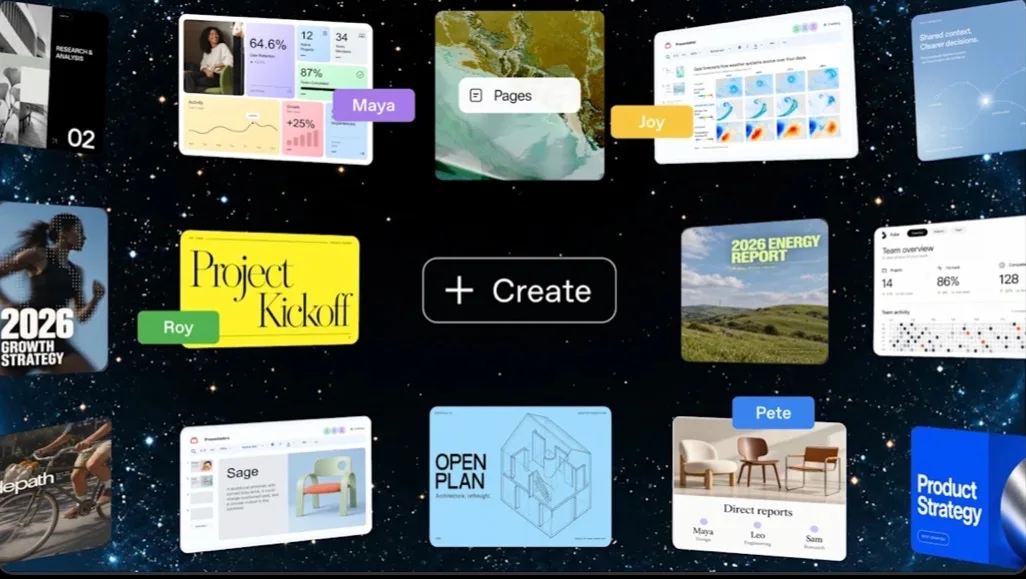
If you think of ChatGPT as a tool where you ask and it answers, Space changes that. Documents, sources and results now stay in one place, and people and AI can keep editing them for days.
Start with this picture
Standard ChatGPT is a long messenger thread with a very capable person. ChatGPT Space is a project room where you walk in and work with that person.
In a chat window, the table you built yesterday scrolls out of sight. Finding a good sentence means scrolling for a long time. In the end you copy the important answers into Word or Google Docs.
Space works differently. You lay out a plan, research, tables, images and meeting notes inside one room. Then you open one item and say, "Rewrite just this paragraph," "Turn this data into a chart," or "Fold in the comments my teammate left."
What is inside a Space
- Space: the room. A workspace for one task or topic. Related pages and files sit in one place.
- Page: a document on the desk. A document you can edit directly. It can hold text, tables, charts, images and other work products.
- dot: the AI employee. An always-on agent for ongoing work. It uses connected apps and its own cloud computer to get things done.
The biggest change: the output stays, not just the answer
Even heavy ChatGPT users often repeat the same loop. Ask a question. Get a good answer. Ask for edits. Copy the finished text into Word or Google Docs. Days later, hunt through old chats to change it again.
Space's Page tries to remove that last step. The page itself becomes the final work product. You can edit it by hand, or have ChatGPT revise a specific part of the same document. You can also invite others to edit together or add comments.
| Standard chat | ChatGPT Space | |
|---|---|---|
| Basic unit | Conversation | Space and Page |
| Output | Answers pile up inside the chat | An editable document that keeps developing |
| Revision | Ask again and get a new answer | Edit the same page by hand or with AI |
| Collaboration | Mostly personal chat | Several people edit a shared page |
| Organization | Dig through long chats | Pages, subpages and folders |
Example: planning a trip
The old way: ask, "Plan a five-day Tokyo trip," then keep adding questions about hotels, restaurants, transport and budget. After 30 minutes the chat is long, and you have to find where the final itinerary is.
In Space, you create a room called "Tokyo Trip." Inside, you set up pages for the full itinerary, hotel candidates, restaurants and budget. If you change the hotel in the itinerary, ChatGPT can recalculate the related budget and routes. You can share the page with family and let them add comments directly.
Office work follows the same pattern. A "New Product Launch" Space can hold market research, a plan, meeting minutes and a schedule, all developed in the same context. The point is that you explain the situation to the AI from scratch less often.
With dot, the workroom gets a resident employee
OpenAI released the agent under the name dot. Unlike a regular chat, dot is designed to take on ongoing responsibility. It is built on GPT-6 Astra and uses its own cloud computer. It can connect to apps the user allows and keep working between conversations.
Put simply, if ChatGPT is an expert you ask on the spot, dot is closer to an AI employee you hand a job to: "Keep an eye on this one." OpenAI says it can connect to more than 4,000 apps through its plugin ecosystem.
One caution against overstating it. Not every Space page refreshes itself with live outside information. OpenAI's help documentation states that "Keep updated," the automatic page refresh feature, is not available at launch.
Sharing does not expose your whole personal ChatGPT
When you share a page in Space, the recipient by default sees what is on that page. Your private chat history and personal ChatGPT memory are not shared wholesale.
One point to remember: if ChatGPT used your memory or personal context to write something into the page, that text becomes shared content. The distinction matters. Personal memory is not shared, but output written into a document using that memory can be.
Who can use it
Page creation and editing in Space are currently supported on ChatGPT Pro, Business and Enterprise. On the web and the desktop app, you can create and edit. On mobile, you can find, read and share pages and move between them, but direct editing is not currently supported.
Existing Projects are not going away. Space replaces Library, but Projects stays as a separate feature. A simple way to see it: Projects bundles conversations, files and project instructions, while Space is where people and AI work together around outputs and pages.
Insight Times Editorial Desk